Playing RISK IT! on Phone and Tablet
Last checked · Checked against the development build
Can you play RISK IT! on mobile?
Yes. RISK IT! supports phones and tablets: tap the RISK IT! prompt at a pad, then use the large on-screen buttons. Movement challenges dock their panel at the top so the thumbstick and jump button stay clear. The layout has been checked in Roblox Studio's Device Simulator; real phones are next.
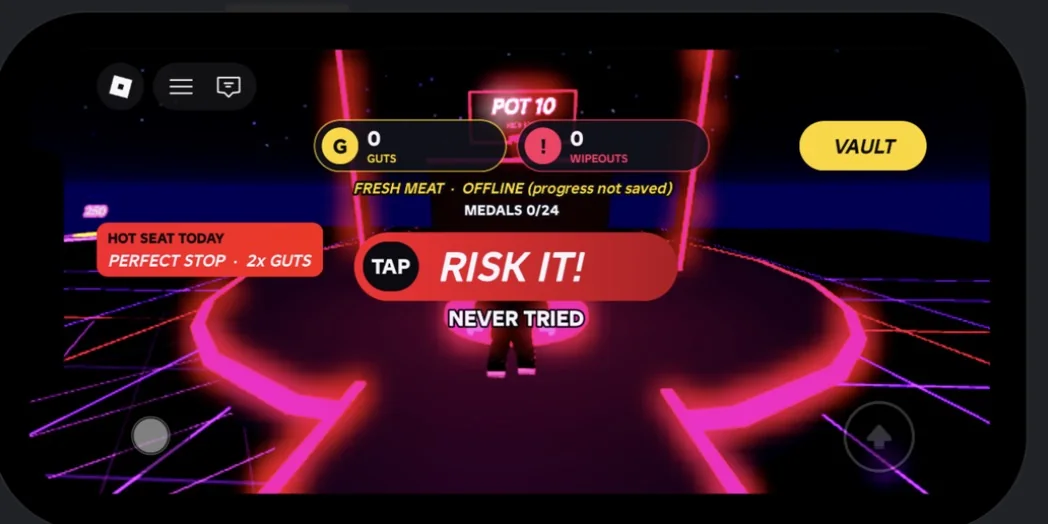
What changes on touch
- The RISK IT! prompt is a button you tap; it sits at pad level so it never covers the HUD.
- Challenge buttons are at least 44 pixels tall, the standard minimum for a comfortable tap.
- PERFECT STOP and QUICK DRAW accept a tap anywhere on the screen.
- COPY THAT shows four arrow buttons.
- Keyboard hints like SPACE and Q are hidden.
- THE VAULT fills the space under the Roblox top bar and scrolls with your finger.
Movement challenges
In THE SWEEPER, DOOR NUMBER WHO and MELTDOWN the challenge panel is a slim strip at the top of the screen. The middle of the screen, where the bridge, doors and tiles are, stays clear, and Roblox's own thumbstick and jump button work as normal.